Google Has a Cool The Legend of Zelda: Ocarina of Time Easter Egg That Lets You Travel Back in Time to 1998. Here’s How to Find It
A nostalgic surprise celebrates the upcoming release of the Nintendo Switch 2 remake

Can you imagine traveling back in time with a single click, just like Link? It may sound impossible, but Google has prepared a fun and nostalgic surprise to celebrate the legacy of The Legend of Zelda: Ocarina of Time, one of the most acclaimed games in history, which will soon return with a remake for Switch 2.
The little Easter egg hasn’t gone unnoticed by the franchise’s millions of fans, who will soon be able to return to Hyrule and relive one of gaming’s most epic adventures. Google’s surprise is a great touch, so here’s how to find and activate it.
Google Surprises Fans With a The Legend of Zelda: Ocarina of Time Easter Egg
Since its release in 1998, The Legend of Zelda: Ocarina of Time has become one of the most beloved and acclaimed games of all time. It revolutionized gameplay and storytelling, helping shape the industry’s transition to 3D. That’s one of the many reasons why its Switch 2 remake has generated so much excitement.
The new version of Link’s adventure will arrive on Switch 2 on November 5, so Google decided to surprise fans of the series with a wonderful dose of nostalgia. It’s an Ocarina of Time Easter egg that you can activate directly in Google’s browser.
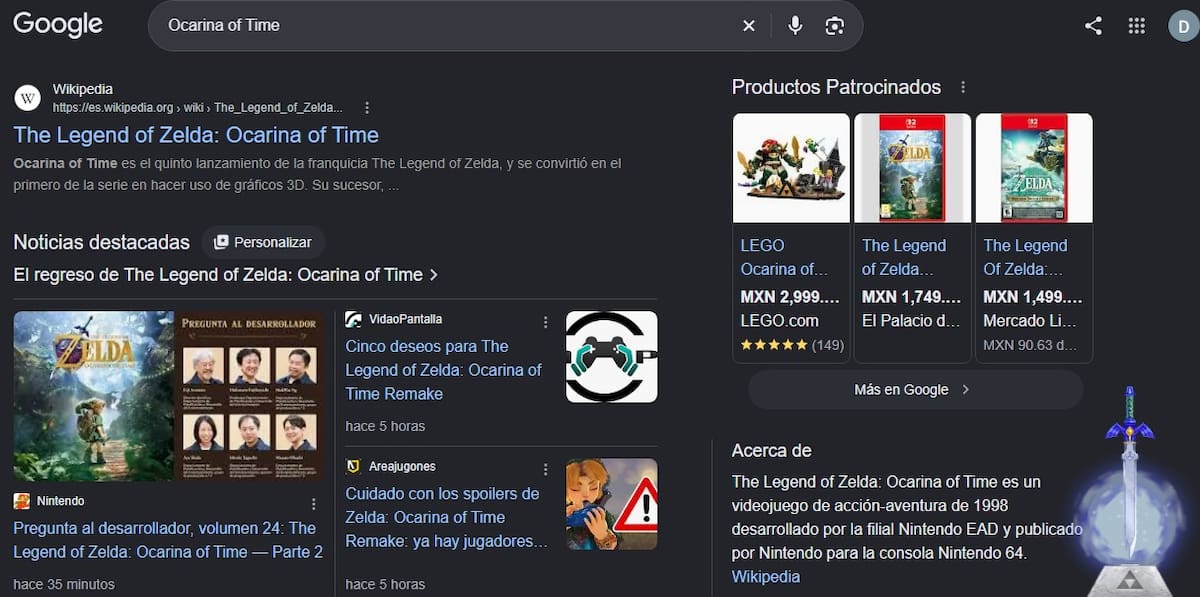
Once you activate it, you’ll see the Master Sword and its pedestal in the bottom-right corner of your screen. Click on it to unleash its power, just like Link, and a special screen featuring the Triforce and a nod to Nintendo’s game will appear.
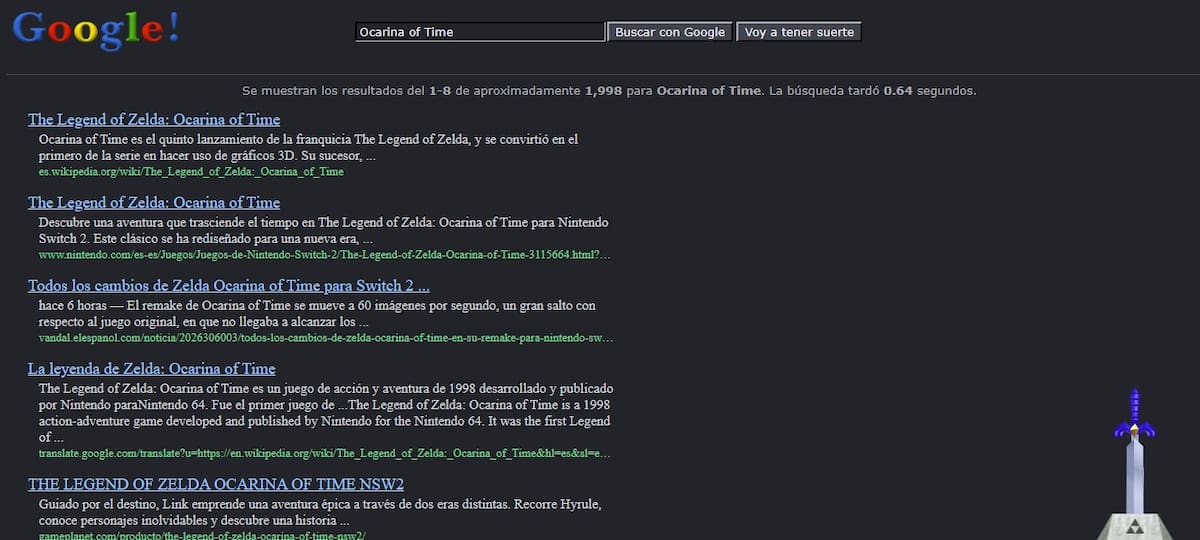
The coolest part is that the Easter egg actually takes you back in time to 1998. Once the Master Sword is placed in its pedestal, Google’s browser will adopt a retro appearance, looking just as it did back when the Nintendo 64 and The Legend of Zelda: Ocarina of Time were revolutionizing the industry.
Besides being a clever surprise, it’s a genuine nostalgia trip for anyone who grew up during that decade and played the game when it first launched. What’s more, the Easter egg is inspired by one of the most emotional moments in the adventure: when Link pulls the Master Sword and travels through time to save Zelda and stop Ganondorf.
Google also includes a nod to those who experienced Internet culture in 1998, as the retro browser gives the surprise an extra dose of nostalgia.
How to Activate The Legend of Zelda: Ocarina of Time’s Nostalgic Google Easter Egg
It’s incredibly easy to see the Easter egg for yourself and take a trip to the past. All you need to do is open Google and search for “Ocarina of Time” or “The Legend of Zelda.” Once the results appear, Link’s sword will show up on your screen, allowing you to activate its power.
Your browser will automatically change its appearance, letting you browse Google as it looked in 1998. You’ll even see the iconic “I’m Feeling Lucky” button. Simply visit any website or perform another search to return your browser to its normal appearance.
Fans looking forward to the The Legend of Zelda: Ocarina of Time remake were delighted by this Easter egg, which pays a fitting tribute to one of the greatest video games of all time.
As one fan pointed out on social media, searching for “Ocarina of Time” on Google lets you travel back to a 1998 search page.
You can find all our news about The Legend of Zelda on our website.
Recommended For You
 News
New Free-to-Play Open-World RPG Full of Mystery and Combat Headed to PS5 and PC
 News
HoYoverse Unveils ‘Petit Planet’, A Free-to-Play Game Launching Soon on Mobile and Nintendo Switch 2
 News
Xbox Game Pass: November Brings Disappointing Departures Including a Fan-Favorite Dragon Ball Title and 13 Other Games
 News
Comentarios
Inicia sesión desde el menú superior para dejar un comentario.
Sé el primero en comentar.