Minecraft has a dangerous bug that deletes all your worlds, how to avoid it?
By Daniel Laguna onMojang warned players about the problem and gave them some recommendations

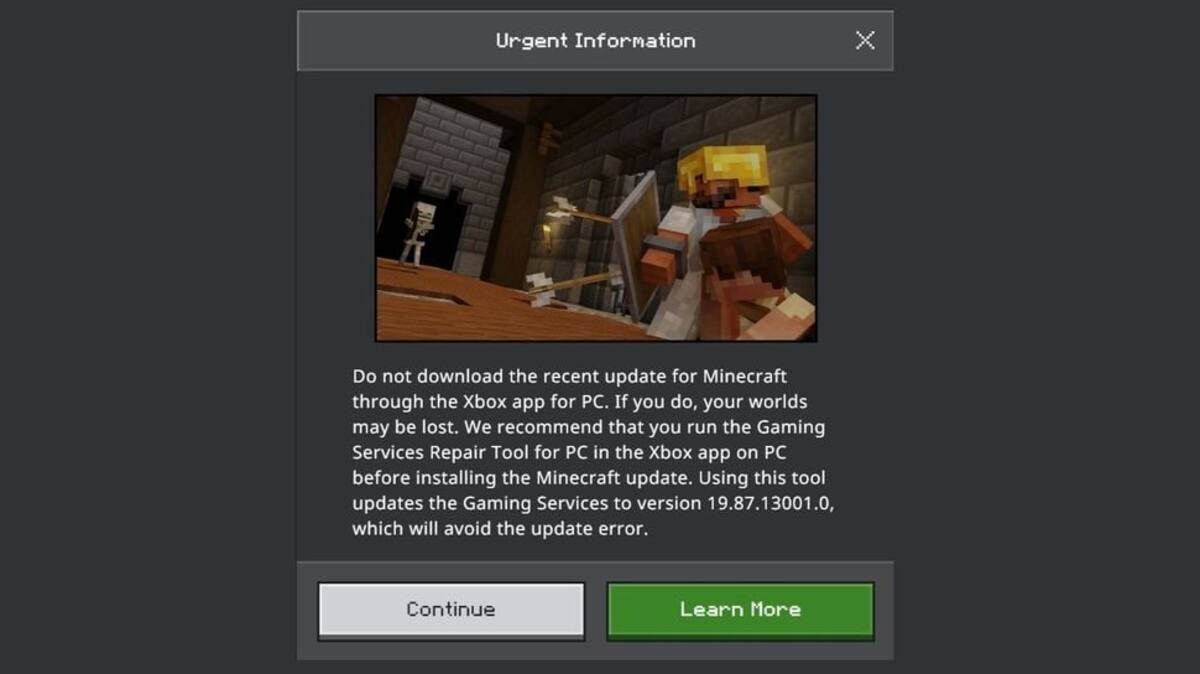
Through its social networks, Mojang Studios made an important warning to Minecraft players. It asked them not to update the game through the Xbox app on PC, as this may cause all their worlds to disappear in the game. This is an annoying and dangerous bug that can put the community's content at risk. For this reason, the studio made some additional recommendations so that no player is affected. Below, we tell you how to avoid this problem.
Do not update Minecraft from the Xbox app
Mojang Studios asked all players not to download the most recent Minecraft update via the Xbox app on PC. By doing so, the community risks losing all their worlds and the time they have dedicated to the title for years.
It is important to follow this recommendation since, at the time of writing this, it is not known if it will be possible to recover the lost content once it is removed by the error. On the other hand, it is worth mentioning that this bug does not affect the Java version of the game.
How to avoid the Minecraft bug that deletes worlds?
Avoiding the disaster caused by this bug is simple. Mojang Studios recommended players to first run the PC game service repair tool, which is available in the Xbox app. Afterwards, it will be possible to update the game to version 19.87.13001.0, which prevents the problem. To achieve this, you just need to follow a few simple steps:
- On your PC, open the Xbox app
- Click on your profile picture
- Go to the Support section
- Start the Game Services Repair Tool
- Click on Start Troubleshooting
About the author

Recommended For You
 News
Will Physical Xbox 360 Games Be Added to the Disc to Digital Program? Post Sparks Excitement Among Players, but There’s Bad News
 News
Halo Has a Surprise in Store for Fans of the Franchise and Will Bring Back One of Its Most Beloved Cooperative Modes
 News
GTA 6 Copies Missing Download Codes? Players Report a Concerning Defect in the Game’s “Physical” Edition
 News
Comentarios
Inicia sesión desde el menú superior para dejar un comentario.
Sé el primero en comentar.